App details
The ask abi app was imagined, in desperation, by a person with an ABI. This was after diligently trying the suggested memory strategies and finding them sadly lacking when it came to engaging in meaningful conversations and maintaining relationships.
The name is an abbreviation of ‘acquired brain injury’ in an attempt to put a positive perspective on letters that are, for many, like daggers to the heart.
The logo was chosen as elephants are known to have good memories and, in some cultures, an elephant with an upward-facing trunk is considered to bring good luck.
Why ask abi?
Current memory aids (writing a note, taking a photo, having a whiteboard on the fridge, using a calendar, setting an alarm) are fine for transactional purposes such as getting to appointments on time but they do not effectively assist with tracking relationships.
Yet we know that relationships are what keep us connected and nurture our souls.
Many people with an ABI, and other memory issues, report feeling disconnected and isolated. Rates of depression and suicidal ideation amongst this population are well documented.

Photo by Patrick Perkins on Unsplash
What is ask abi?
Under the guise of a simple app sits a complex program designed to easily record and recall social interactions. It is a simple to operate, customisable calendar where entries are made by selecting from drop down tabs. These drop down tabs double as a search engine for easy access to entries.
Questions from people in a social setting generally fit into one of four categories:
- Have you seen (a person)?
- Have you been to (a place)?
- Have you done (an activity)?
- What did you do on (a certain day)?
WHO?
WHERE?
WHAT?
WHEN?
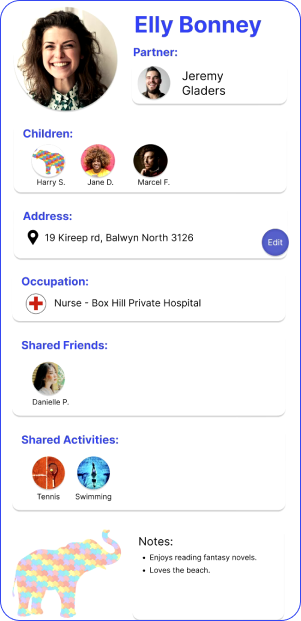
Who tabs...
On set up, ask abi will prompt the user to populate tabs with names of the people they see regularly.
There will also be an ‘other’ tab where the user can list a casual contact. These tabs will be able to be added to, or deleted, as required.
Once selected, further details can be added to the entry, e.g. nickname, surname.
It will also be possible to have several ‘who’ lists to save scrolling too far down one list, e.g.: a family list, a friends list and a medical/care team list. Other customised lists can be created as needed.